.gif)
.JPG)
I was able to access the layout page of blogger.
There must me some interesting changes going on over there.
If your blog roll doesn't update or you have issues editting the list
Try this:
1. Go to the THEME section in your dashboard
2. Click the down arrow next to CUSTOMIZE
3. Click Edit HTML be careful
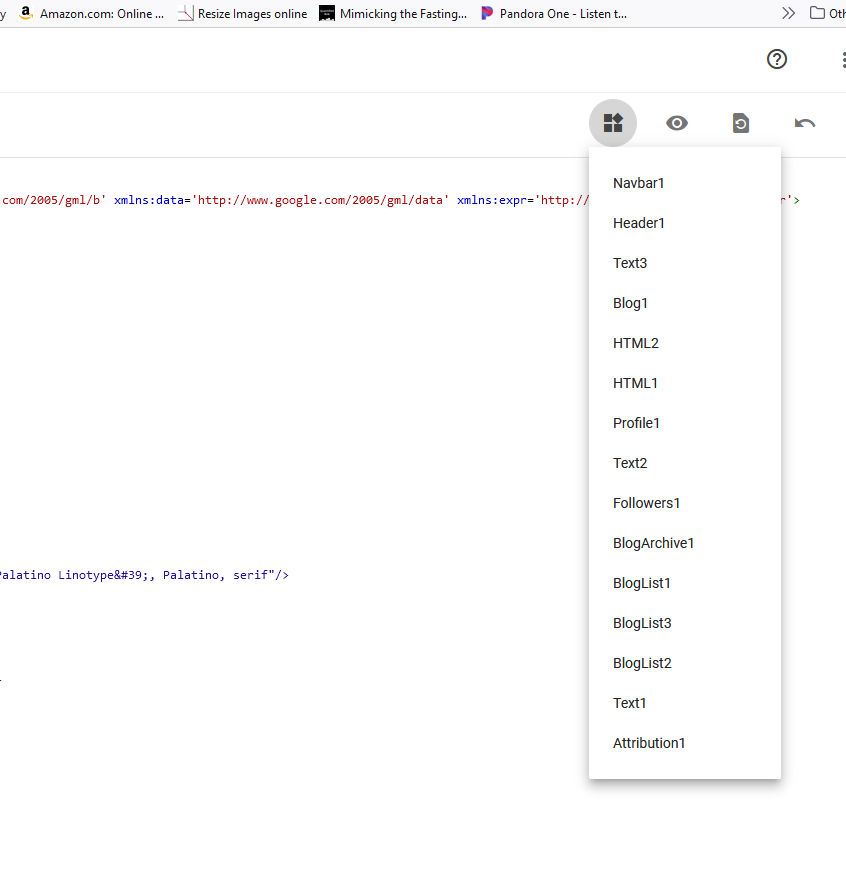
4.The HTML page will display. In the upper right hand corner there are some icons
hover over them so see what they do. The one with 4 squares will open up
"jump to widget"
5. Search for your blog list as you can see mine has bloglist 1 , 2 , and 3.
6. When you click on the widget it will take you to the code.
when I was having issues my old setting had a "display 50" blogs in sidebar.
for some reason they only allow 10. Check your code at each blog list widget if you have
more than one.
7. Edit only the number as you can see in the last picture.
Only make one change at a time, save your work (see last picture ) and go back and view the blog to see if
it worked.
8. Note , the save icon is the small floppy disc in the upper right hand corner.




Recently I noticed that I can't get to my layout page in blogger. The Gremlins must be hard at work

For now I can't edit any of the items on the blog. Just posts can be done. I have tried
Chrome, Firefox, Brave, Bing, etc.
There are some others that appear to be having this issue.
I'll give it a few days to see if it self corrects.
Irish
This guy has me beat, carrying 2 five hundred pound titanium balls with him.
And, a death wish.

Someone has obviously been there before.

Does anyone recognize the crater??

If you want to hammer the Elite Supremacists residing on the Ivory Isle of
Martha's Vineyard, go here and share some of the plethora of MEMES <<<
We are winning the MEME war using the lefts own idiocracy and hypocrisy to expose them.
.JPG)
.jpg)
.jpg)
